

The picture
Ask “how long do card refunds take?” and the agent looks it up instead of guessing. The answer arrives with a Sources row under it, one chip per cited document.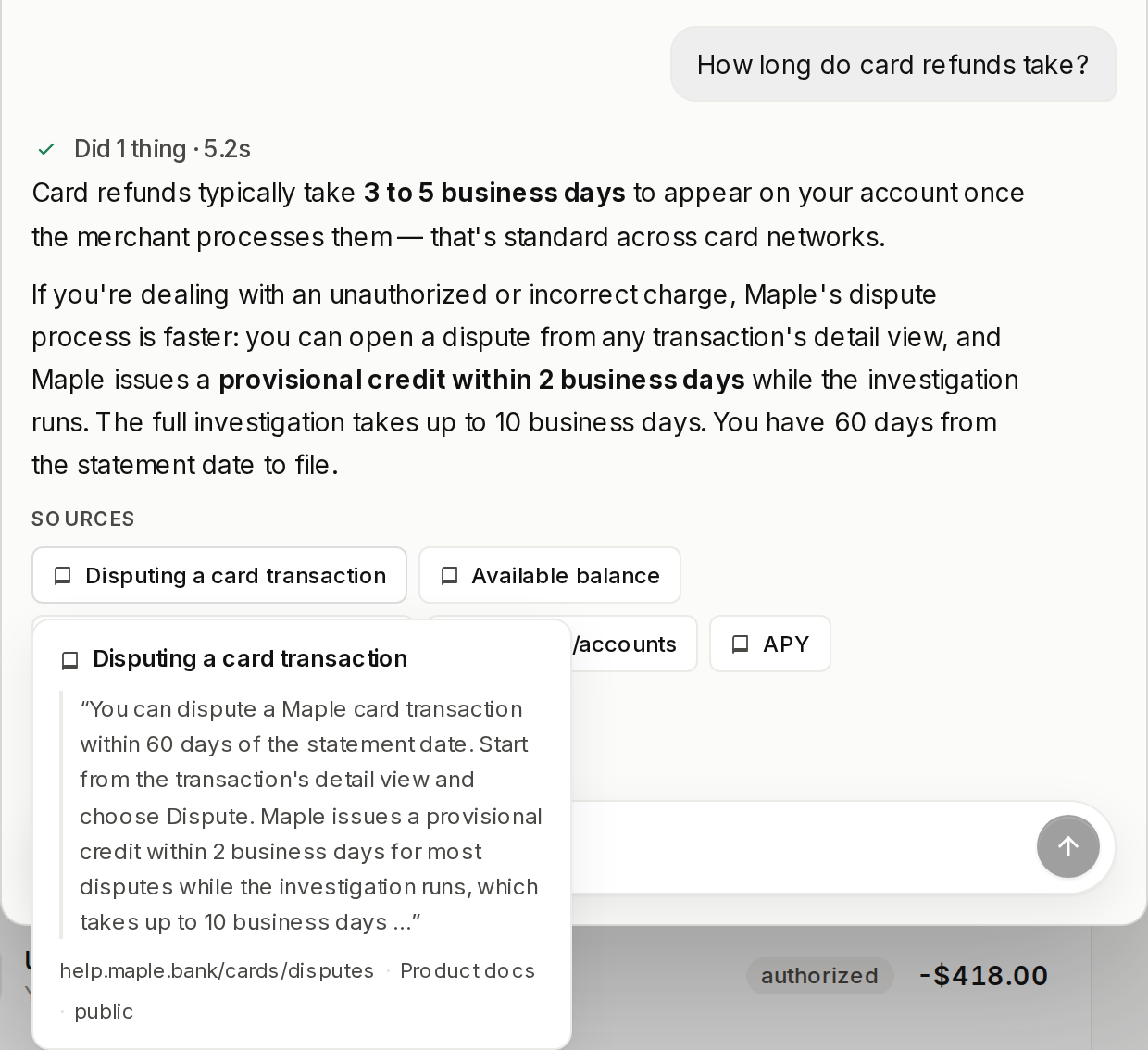
VENDO_API_KEY is the whole setup. The knowledge slot fills with the Cloud
engine, and the agent picks up its vendo_knowledge_search tool with no code
change.
Load your docs
1
Add them in the console
Open console.vendo.run and
go to Knowledge. Upload files takes documents straight off your
machine. Crawl a URL points the crawler at a docs site you already
publish.Indexing is not instant, and the page does not spin while it runs. Right
after an upload the tab still reads “0 documents indexed”.Refresh after a few seconds and the count flips to the real number. That
is how you know the corpus is searchable.
2
Prove it in the Playground
Still in the Knowledge tab, open Playground and ask something your
docs answer. The result shows whether the answer clears the evidence bar,
which document it cites, and a match score.A higher score is a stronger match. The passage under the green Would
answer banner is the one the agent answers from, and a passage marked
Below the bar was retrieved but not cited.
Docs that live in your repo
If your documentation sits next to your code, push it from the repo instead of uploading by hand.add only writes a source entry into .vendo/knowledge.json. sync is the
one verb that moves content.
It ingests the files, diffs them against the hash manifest at
.vendo/knowledge-manifest.json, upserts what changed, removes what vanished,
and rewrites the manifest last. A second run over unedited files pushes
nothing.
Say what shape a file is
--kind decides how a file is cut up. docs is the default and chunks prose
at heading boundaries.
glossary and api make every heading its own chunk, which is what makes an
exact term lookup return the term rather than a fuzzy paragraph.
--visibility public|internal and --name <slug>. Run
vendo knowledge remove <name> to drop a source, and
vendo knowledge sync --dry-run to see the plan without moving anything.
Keep it synced from CI
Runvendo knowledge sync after a docs change merges, with VENDO_API_KEY set
as a secret. Every run names the engine it pushed to, so the CI log records
where the docs landed:
When it does not know
The docs do not cover it. The tool answers
insufficient-evidence and
the agent says it does not know rather than filling the gap. The turn shows
“Searched the knowledge base — no matching documentation”.The engine cannot be reached. The tool answers unavailable, never an
empty result that reads as “nothing found”. The turn says the knowledge base
is temporarily unreachable and that the answer is not verified against the
documentation, and the server log carries the real cause once per distinct
failure.Internal docs stay internal. A source added with --visibility internal
answers only trusted host-wired callers. End-user turns never see those
documents, and the prompt’s index names public sources only, so their
existence does not leak either.Where to go next
Instructions
The prose your agent reads before every turn.
Context
Who is asking, and what their screen shows.
Theming
The token file every surface renders through.